Case Study

GoTogether

GoTogether is a mobile sign-up experience designed for older adults living in rural areas, helping them easily register for a government-supported carpooling service. With accessibility placed at the heart of the design, the flow supports users with visual impairments and limited digital confidence, making mobility feel closer and more achievable.

Background

Many older adults depend on others to get around. In rural areas where buses run rarely, or not at all, something as simple as visiting a friend or attending a medical appointment becomes a logistical challenge.


GoTogether was created to help bridge that gap. The app connects older riders (ages 70–85) with local drivers who have available seats, but for the service to truly work, the very first step needed to feel approachable: the sign-up process.


This project wasn’t just about designing a form. It was about designing comfort, clarity, and confidence for users who often feel left behind by digital tools.


Goal

Our goal was to create a sign-up flow that feels peaceful and predictable, especially for users with vision impairments or limited technological experience.


GoTogether needed to reduce cognitive load, minimize errors, and support older users with warm, accessible design choices, so that registering becomes not a hurdle, but a smooth starting point.


Process

We began by studying the unique challenges that come with aging: reduced contrast sensitivity, shaking hands, difficulty interpreting error messages, and unfamiliarity with modern UI patterns. These insights shaped our design from the beginning.


Early Ideation – RideOn

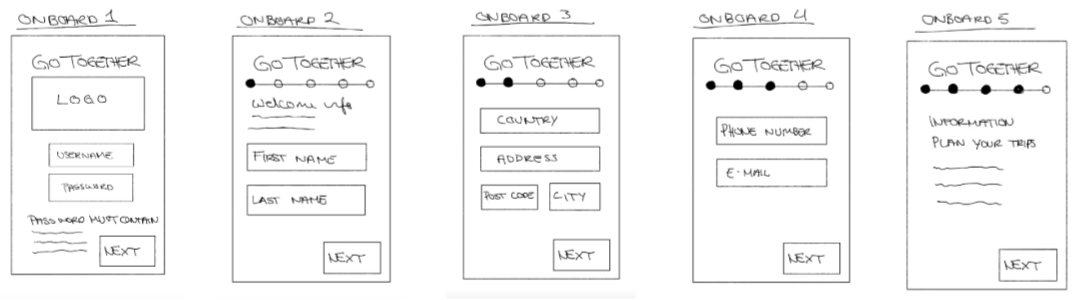
In the initial stages, we explored an alternative concept called RideOn, a low-fidelity prototype focused on testing tap targets, text sizes, and basic form layouts. RideOn served as a playground where we could test assumptions, identify usability barriers, and spot early accessibility pitfalls.


This exploration helped solidify what our final product truly needed to be: calmer, clearer, more linear, more intuitive.


Developing GoTogether

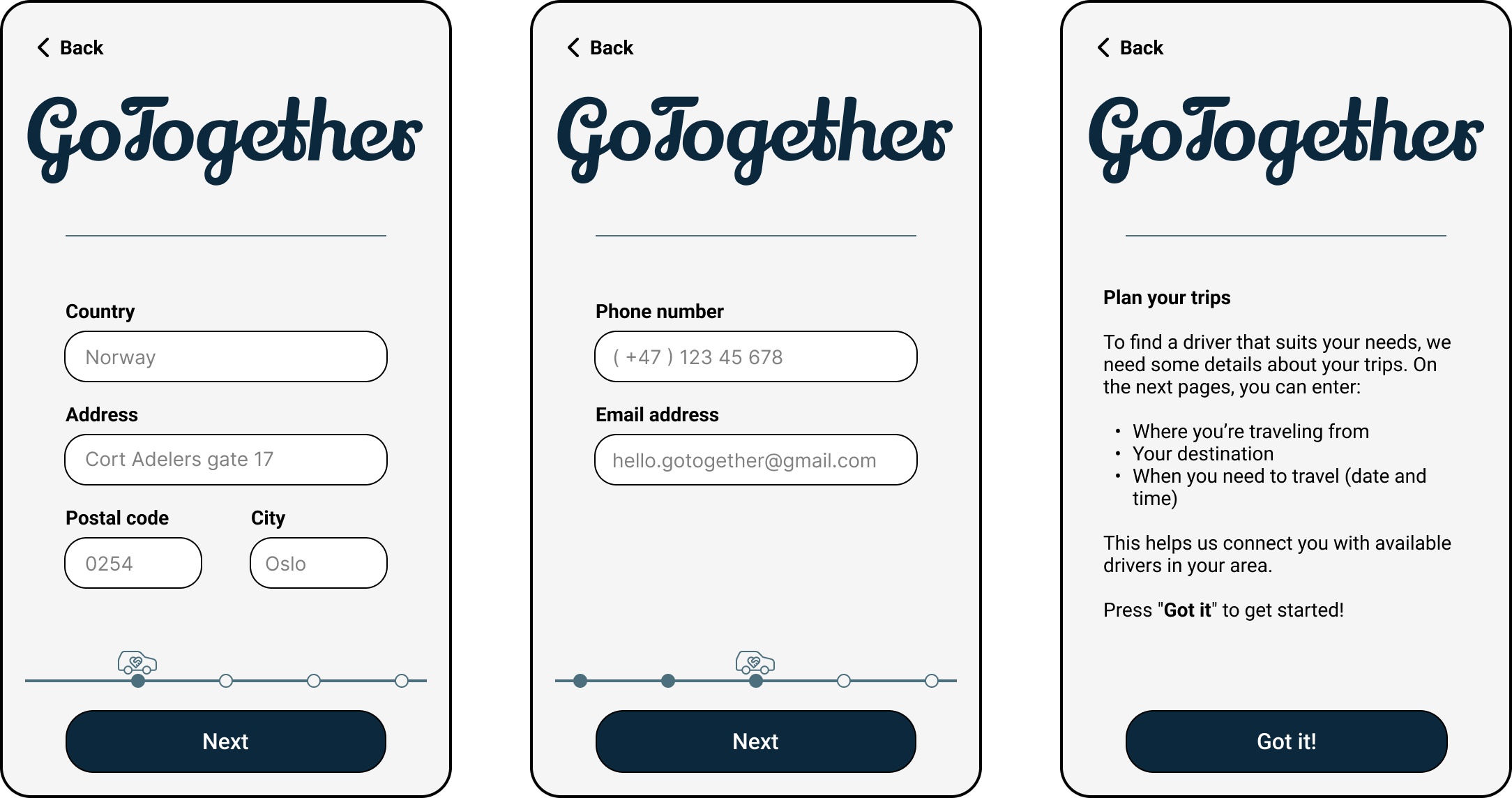
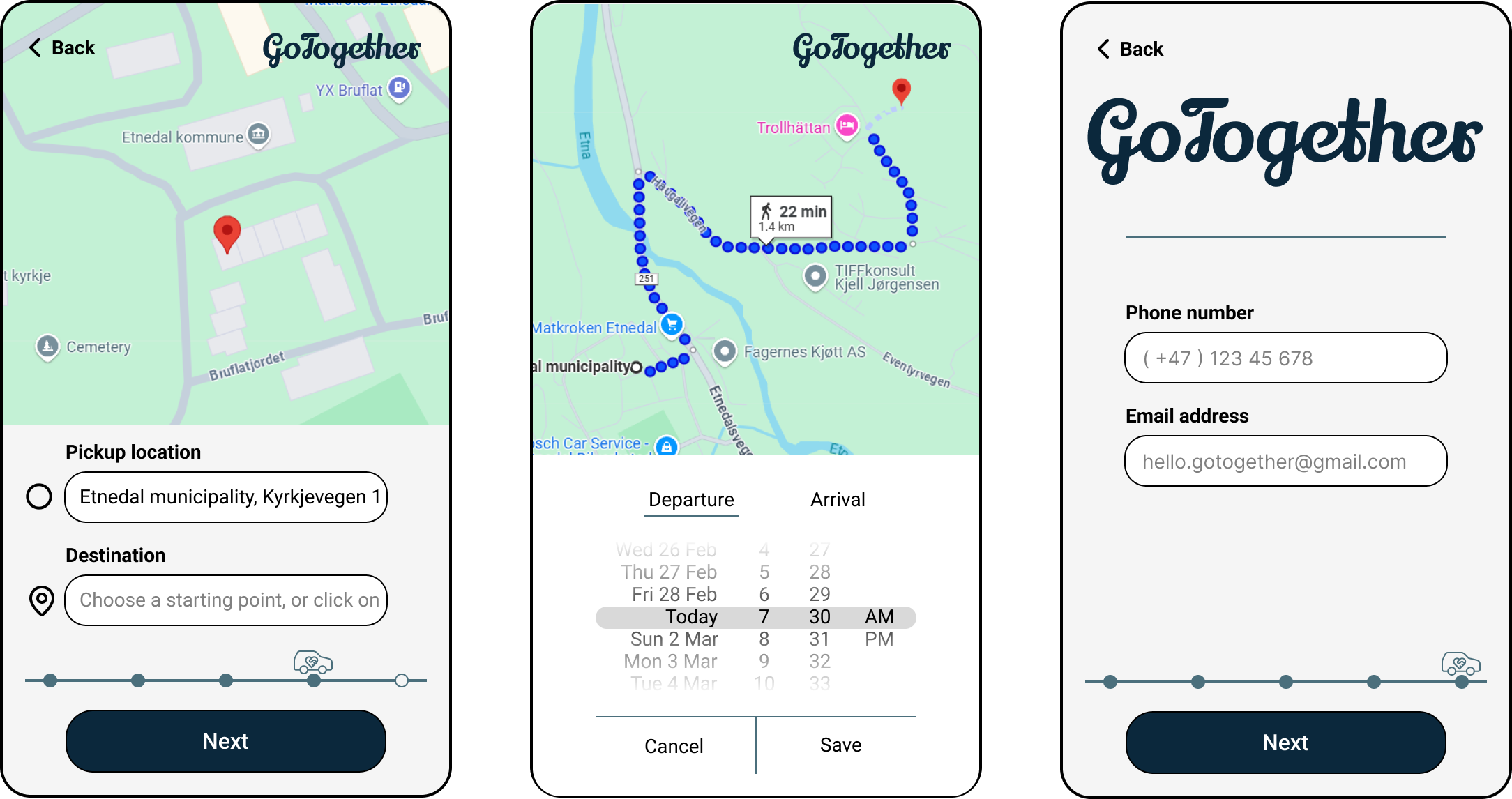
With these learnings, we built the GoTogether sign-up flow. We prioritized:

  • one-step-at-a-time navigation
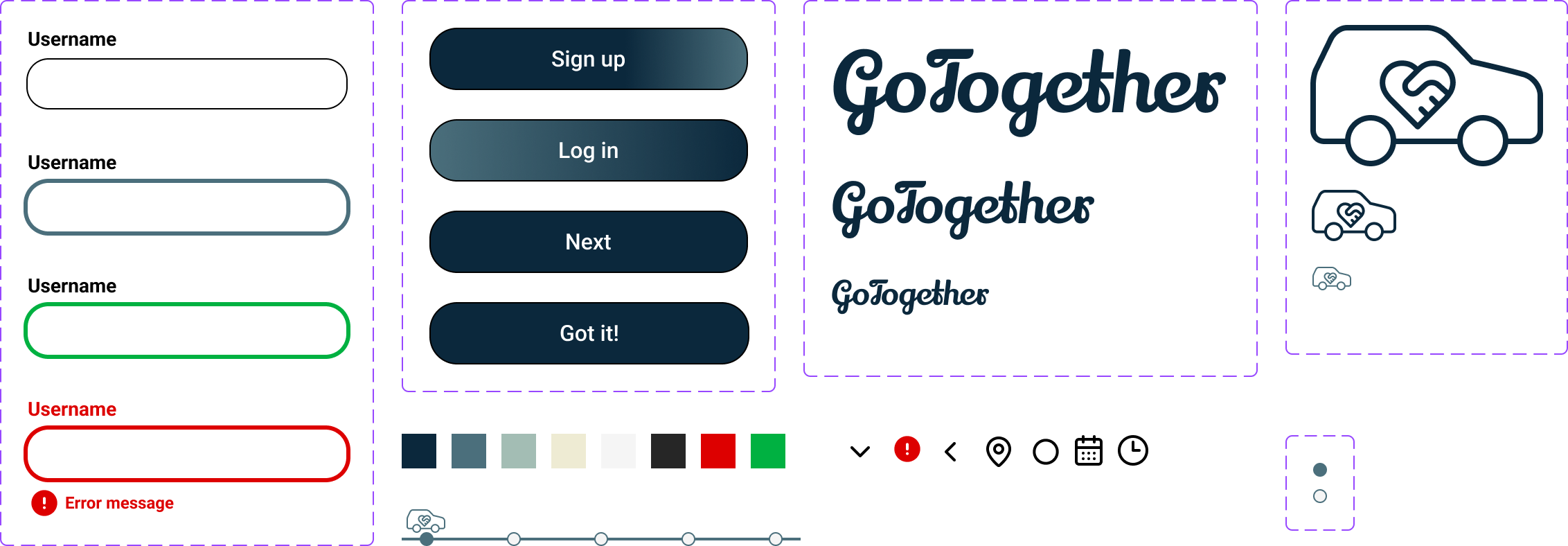
  • large, clearly defined input fields
  • persistent labels and guidance
  • WCAG-compliant text sizes and contrast
  • accessible error handling
  • predictable layout patterns
  • and a visible progress indicator to reduce uncertainty

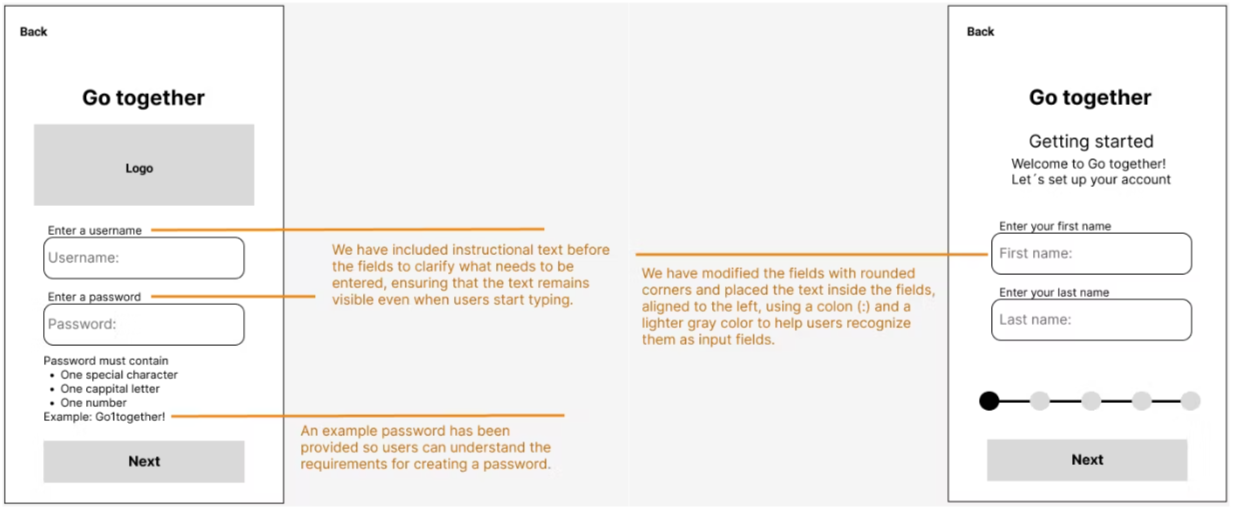
We conducted usability testing with an older participant. Her feedback illuminated subtle but important issues: input fields were not immediately recognizable, and password requirements needed clearer examples. These insights became catalysts for refinement.


Iterating Toward Clarity

We updated the input fields with stronger outlines, larger touch areas, and more recognizable shapes. We added help text above each field and introduced a password example to reduce confusion and anxiety.

Little by little, GoTogether became simpler, kinder — and far easier to complete without hesitation.


Result

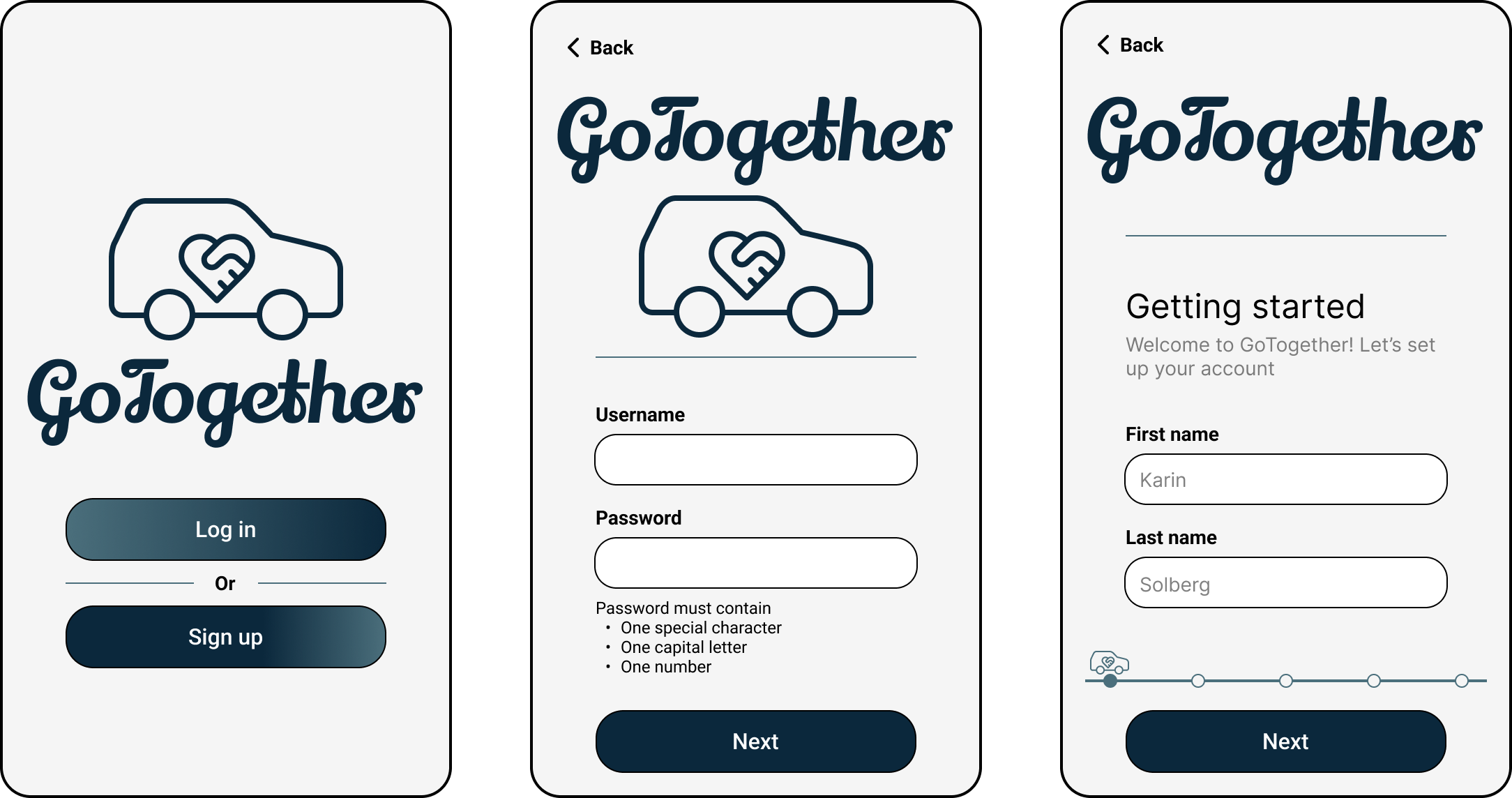
The final GoTogether sign-up flow is a calm, accessible, and highly readable experience designed for an older audience. It includes:

  • large, spacious type and tap areas
  • high-contrast visual design
  • friendly and precise error messages
  • a linear, step-by-step structure
  • clear guidance at every point
  • and thoughtful accessibility decisions grounded in user testing

GoTogether doesn’t overwhelm the user with choices or complexity. Instead, it guides them gently — one screen, one action, one success at a time.


What I Have Learned

This project deepened my understanding of accessibility as an emotional discipline, not just a technical one.

I learned how to design for reassurance:

  • how contrast helps reduce hesitation
  • how well-placed instructions build trust
  • how predictable layouts can calm the mind
  • and how clarity can empower users to feel capable, not confused

I also saw the power of real user feedback — how one person’s moment of confusion can inspire an entire design improvement that benefits hundreds. Most of all, I learned that accessible design isn’t a layer added at the end. It’s woven into every pixel from the beginning.


Case Study

GoTogether

GoTogether is a mobile sign-up experience designed for older adults living in rural areas, helping them easily register for a government-supported carpooling service. With accessibility placed at the heart of the design, the flow supports users with visual impairments and limited digital confidence, making mobility feel closer and more achievable.

Background

Many older adults depend on others to get around. In rural areas where buses run rarely, or not at all, something as simple as visiting a friend or attending a medical appointment becomes a logistical challenge.


GoTogether was created to help bridge that gap. The app connects older riders (ages 70–85) with local drivers who have available seats, but for the service to truly work, the very first step needed to feel approachable: the sign-up process.


This project wasn’t just about designing a form. It was about designing comfort, clarity, and confidence for users who often feel left behind by digital tools.


Goal

Our goal was to create a sign-up flow that feels peaceful and predictable, especially for users with vision impairments or limited technological experience.


GoTogether needed to reduce cognitive load, minimize errors, and support older users with warm, accessible design choices, so that registering becomes not a hurdle, but a smooth starting point.


Process

We began by studying the unique challenges that come with aging: reduced contrast sensitivity, shaking hands, difficulty interpreting error messages, and unfamiliarity with modern UI patterns. These insights shaped our design from the beginning.


Early Ideation – RideOn

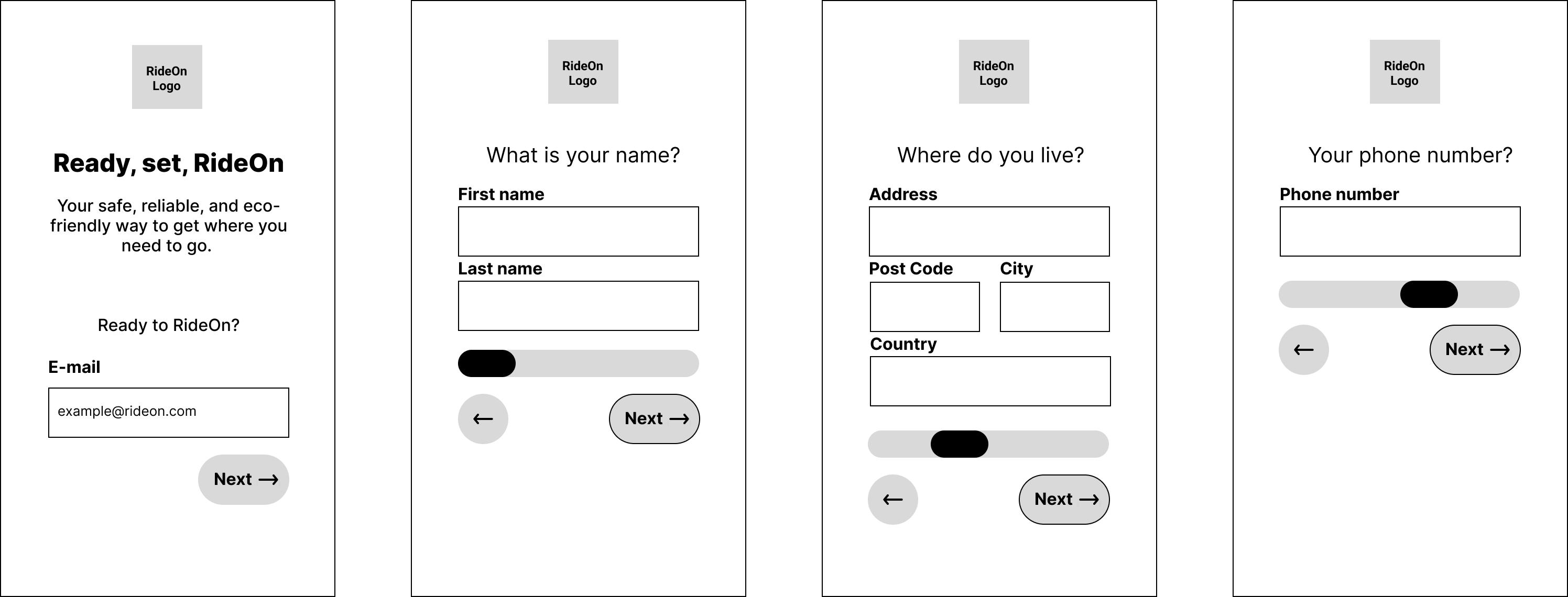
In the initial stages, we explored an alternative concept called RideOn, a low-fidelity prototype focused on testing tap targets, text sizes, and basic form layouts. RideOn served as a playground where we could test assumptions, identify usability barriers, and spot early accessibility pitfalls.


This exploration helped solidify what our final product truly needed to be: calmer, clearer, more linear, more intuitive.


Developing GoTogether

With these learnings, we built the GoTogether sign-up flow. We prioritized:

  • one-step-at-a-time navigation
  • large, clearly defined input fields
  • persistent labels and guidance
  • WCAG-compliant text sizes and contrast
  • accessible error handling
  • predictable layout patterns
  • and a visible progress indicator to reduce uncertainty

We conducted usability testing with an older participant. Her feedback illuminated subtle but important issues: input fields were not immediately recognizable, and password requirements needed clearer examples. These insights became catalysts for refinement.


Iterating Toward Clarity

We updated the input fields with stronger outlines, larger touch areas, and more recognizable shapes. We added help text above each field and introduced a password example to reduce confusion and anxiety.

Little by little, GoTogether became simpler, kinder, and far easier to complete without hesitation.


Result

The final GoTogether sign-up flow is a calm, accessible, and highly readable experience designed for an older audience. It includes:

  • large, spacious type and tap areas
  • high-contrast visual design
  • friendly and precise error messages
  • a linear, step-by-step structure
  • clear guidance at every point
  • and thoughtful accessibility decisions grounded in user testing

GoTogether doesn’t overwhelm the user with choices or complexity. Instead, it guides them gently, one screen, one action, one success at a time.



What I Have Learned

This project deepened my understanding of accessibility as an emotional discipline, not just a technical one.

I learned how to design for reassurance:

  • how contrast helps reduce hesitation
  • how well-placed instructions build trust
  • how predictable layouts can calm the mind
  • and how clarity can empower users to feel capable, not confused

I also saw the power of real user feedback, how one person’s moment of confusion can inspire an entire design improvement that benefits hundreds. Most of all, I learned that accessible design isn’t a layer added at the end. It’s woven into every pixel from the beginning.


Case Study

GoTogether

GoTogether is a mobile sign-up experience designed for older adults living in rural areas, helping them easily register for a government-supported carpooling service. With accessibility placed at the heart of the design, the flow supports users with visual impairments and limited digital confidence, making mobility feel closer and more achievable.

Background

Many older adults depend on others to get around. In rural areas where buses run rarely, or not at all, something as simple as visiting a friend or attending a medical appointment becomes a logistical challenge.


GoTogether was created to help bridge that gap. The app connects older riders (ages 70–85) with local drivers who have available seats, but for the service to truly work, the very first step needed to feel approachable: the sign-up process.


This project wasn’t just about designing a form. It was about designing comfort, clarity, and confidence for users who often feel left behind by digital tools.


Goal

Our goal was to create a sign-up flow that feels peaceful and predictable, especially for users with vision impairments or limited technological experience.


GoTogether needed to reduce cognitive load, minimize errors, and support older users with warm, accessible design choices, so that registering becomes not a hurdle, but a smooth starting point.


Process

We began by studying the unique challenges that come with aging: reduced contrast sensitivity, shaking hands, difficulty interpreting error messages, and unfamiliarity with modern UI patterns. These insights shaped our design from the beginning.


Early Ideation – RideOn

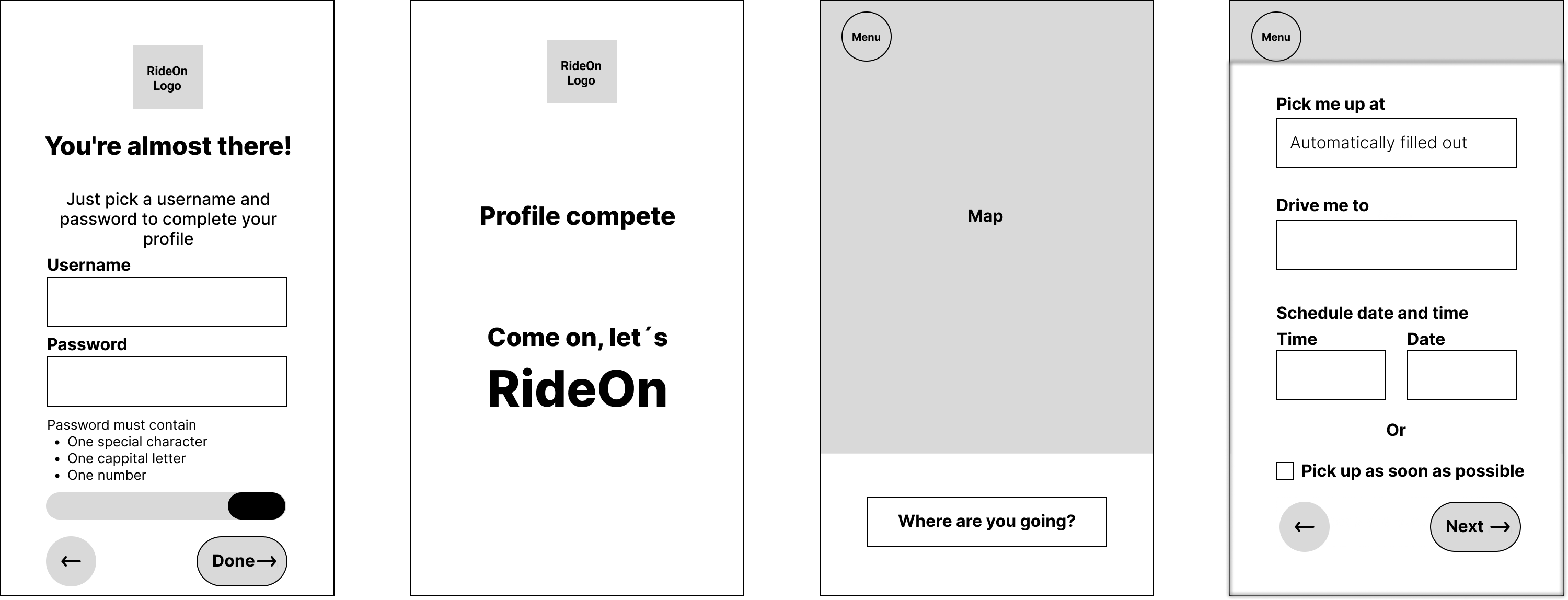
In the initial stages, we explored an alternative concept called RideOn, a low-fidelity prototype focused on testing tap targets, text sizes, and basic form layouts. RideOn served as a playground where we could test assumptions, identify usability barriers, and spot early accessibility pitfalls.


This exploration helped solidify what our final product truly needed to be: calmer, clearer, more linear, more intuitive.


Developing GoTogether

With these learnings, we built the GoTogether sign-up flow. We prioritized:

  • one-step-at-a-time navigation
  • large, clearly defined input fields
  • persistent labels and guidance
  • WCAG-compliant text sizes and contrast
  • accessible error handling
  • predictable layout patterns
  • and a visible progress indicator to reduce uncertainty

We conducted usability testing with an older participant. Her feedback illuminated subtle but important issues: input fields were not immediately recognizable, and password requirements needed clearer examples. These insights became catalysts for refinement.


Iterating Toward Clarity

We updated the input fields with stronger outlines, larger touch areas, and more recognizable shapes. We added help text above each field and introduced a password example to reduce confusion and anxiety.

Little by little, GoTogether became simpler, kinder, and far easier to complete without hesitation.


Result

The final GoTogether sign-up flow is a calm, accessible, and highly readable experience designed for an older audience. It includes:

  • large, spacious type and tap areas
  • high-contrast visual design
  • friendly and precise error messages
  • a linear, step-by-step structure
  • clear guidance at every point
  • and thoughtful accessibility decisions grounded in user testing

GoTogether doesn’t overwhelm the user with choices or complexity. Instead, it guides them gently, one screen, one action, one success at a time.


What I Have Learned

This project deepened my understanding of accessibility as an emotional discipline, not just a technical one.

I learned how to design for reassurance:

  • how contrast helps reduce hesitation
  • how well-placed instructions build trust
  • how predictable layouts can calm the mind
  • and how clarity can empower users to feel capable, not confused

I also saw the power of real user feedback, how one person’s moment of confusion can inspire an entire design improvement that benefits hundreds. Most of all, I learned that accessible design isn’t a layer added at the end. It’s woven into every pixel from the beginning.